Back to Projects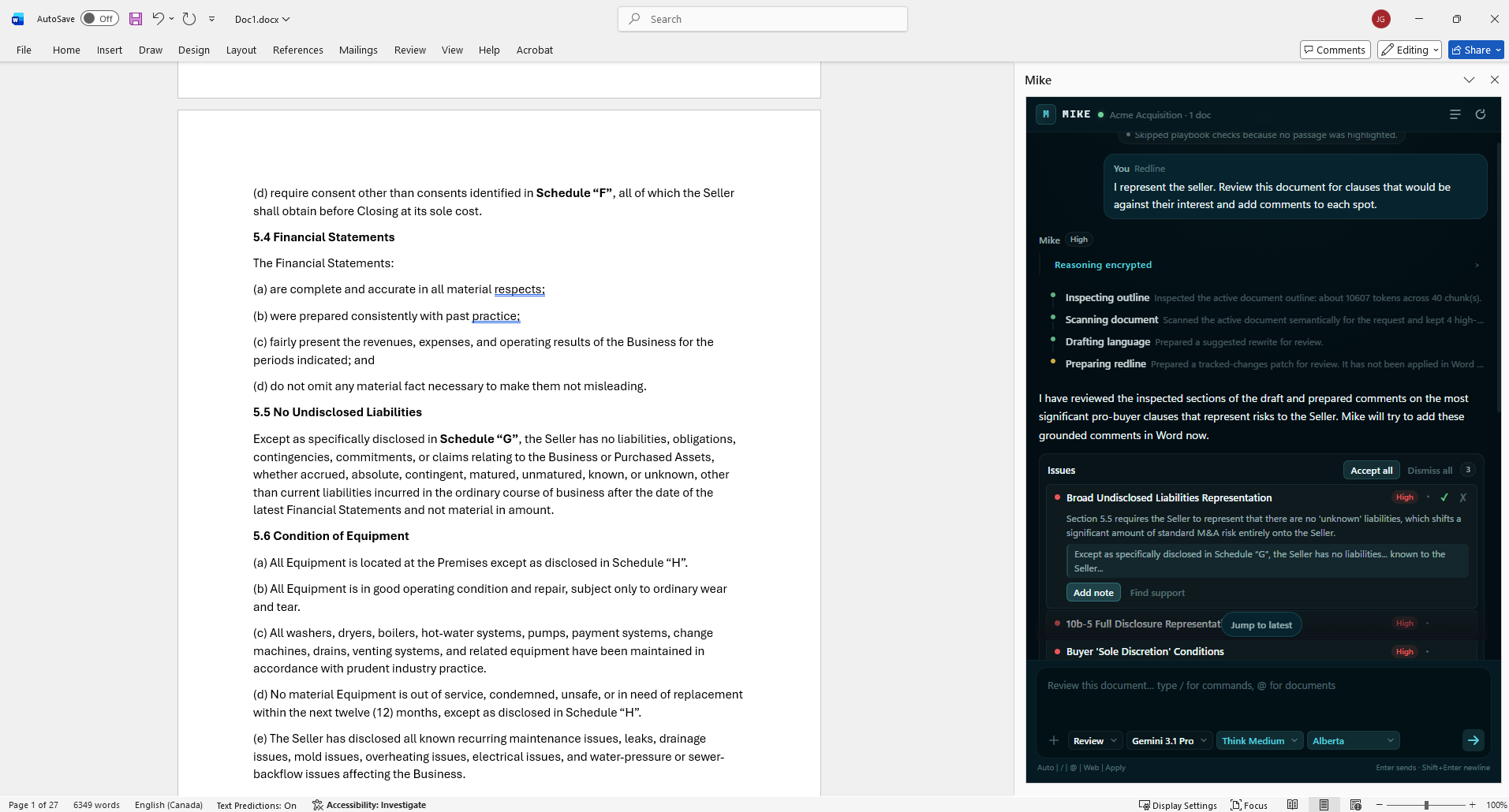
Microsoft Word Add-in
Private Beta
The assistant that lives where legal writing happens
Mike
Mike lives inside Word. You pick the model, give him access to the matter folder, and ask him to draft, comment, and redline right in the document.
Actual Mike product screenshot running inside Word.
Why Mike Exists
Most legal teams still jump between too many places: one tool to ask a question, Word to draft, then shared folders to find context.
Mike pulls that work into one place. You give a clear instruction, he reads the active draft, checks the matter files, and gives you edits you can review right away.
What A Real Review Flow Looks Like
- 1You set a concrete objective, for example: protect the Seller and comment buyer-leaning clauses.
- 2Mike reads the draft, checks the matter folder, and looks at relevant precedents.
- 3He drafts language, applies redlines, and adds comments where they are needed.
- 4You accept, reject, or rewrite. Final legal judgment always stays with you.
What Mike Actually Does
Understands before writing
He starts by reading the active document so proposed edits match the deal and the structure already on the page.
Works across the matter folder
He can pull relevant documents from across the matter folder, so drafting reflects the full file context.
Clean redlines, thoughtful output
He proposes wording, applies readable redlines, and leaves work you can check quickly.
Comments with legal signal
Comments are tied to specific text and explain what should change.
Drafts in your style
He can review your precedents folder and draft in the same tone and structure your team already uses.
Web research when needed
When needed, he can run web searches and bring back useful outside references.
What Makes Mike Different
- You can choose the model for each task.
- Mike can read matter files and precedent documents connected to the workspace.
- He works directly in Word, where your drafting already happens.
- The lawyer keeps final control over what is accepted.